AI Text to Speech for Natural, Multi-Speaker Audio
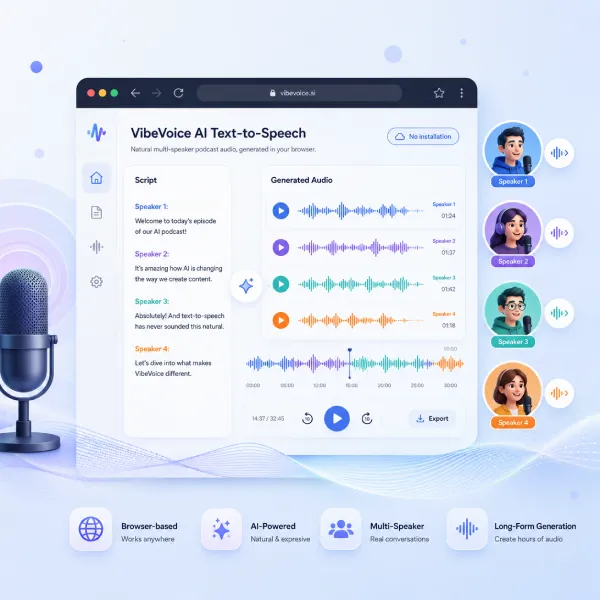
Turn scripts, stories, lessons, and conversations into expressive speech with AI Text to Speech. Choose natural voices, create single-speaker narration or multi-speaker dialogue, and generate polished audio directly in your browser.
Need a walkthrough first? How to Use VibeVoice
Multi-speaker text-to-speech
Long-form TTS
Text to podcast online
Create Natural AI Text to Speech Online
AI Text to Speech turns written content into spoken audio without requiring a new recording session whenever the script changes. Paste a voiceover, lesson, podcast conversation, story, product walkthrough, or training script, choose the voices you want, and generate audio from the text.
Unlike a basic text reader, modern AI Text to Speech supports natural pacing, expressive delivery, one-speaker narration, and conversations with multiple voices. Revise the source text, test another voice, and create a new version without returning to a microphone.
Explore VibeVoice tools
Choose the right AI audio workflow
Use AI Text to Speech for flexible script-to-audio creation, then explore dedicated tools when your project needs a specific workflow.
Key features
AI Text to Speech Features for Modern Audio Creation
90-Minute Long-Form Generation
Generate up to 90 minutes of continuous speech in one pass while maintaining speaker consistency and semantic coherence.
Up to Four Speakers
Create natural multi-speaker conversations with distinct voices, smooth turn-taking, and consistent speaker identities.
Expressive, Natural Speech
VibeVoice produces conversational audio with natural pacing, emotion, and vocal expression.
Multilingual Speech Generation
Generate speech in English, Chinese, and other supported languages for multilingual content workflows.
Tool mechanism
How AI Text to Speech Works
Add your script, choose the voices or speaker roles, generate a short test, then review and download the result. Clear speaker labels and punctuation help create more natural audio.
Whole-Script Context Processing
Instead of generating every sentence as an isolated clip, VibeVoice processes the script as a connected sequence. This helps preserve meaning, timing, and conversational flow from one line to the next.
Speaker-Aware Dialogue Generation
VibeVoice identifies speaker labels and uses the surrounding dialogue to guide each response. This helps maintain clear speaker roles and more natural transitions throughout the conversation.
Contextual Pacing and Delivery
The model uses sentence structure, punctuation, and dialogue context to shape pauses, rhythm, and emphasis. The result feels more connected than stitching together separately generated voice clips.
Use Cases
What You Can Create with AI Text to Speech
AI Text to Speech turns written scripts into natural single-speaker or multi-speaker audio. Use it for podcasts, video voiceovers, audiobook drafts, training narration, product explainers, storytelling, and accessible listen-first content.
Podcast Episodes and Multi-Speaker Shows
Use VibeVoice as an AI podcast generator for scripted episodes, host conversations, interviews, panel discussions, and show pilots. Assign distinct voices to each speaker and create connected podcast audio without recording every participant separately.
Training and Explainer Audio
Create instructor narration, lesson walkthroughs, employee training, product explainers, and role-play scenarios. VibeVoice makes it easier to update the script and regenerate the audio instead of organizing another recording session.
Marketing Audio and Product Demos
Turn landing-page copy, product messages, founder updates, and sales scripts into promotional voiceovers, podcast teasers, audio previews, and product demo narration. VibeVoice helps teams reuse written marketing content across audio channels.
Storytelling and Character Dialogue
Use the VibeVoice AI dialogue generator for fiction scenes, character conversations, interactive stories, game dialogue, and onboarding simulations. Multi-speaker text-to-speech keeps character roles distinct while maintaining natural pacing across the scene.
Audiobooks and Long-Form Narration
Generate chapters, educational content, documentary narration, and other extended voice projects. VibeVoice supports long-form audio generation while helping voices, pacing, and delivery remain consistent throughout longer scripts.
Specs
AI Text to Speech Tool Specs
| Primary Use | Browser-based text-to-speech for creating natural single-speaker and multi-speaker audio from written scripts. |
|---|---|
| Speaker Count | Supports up to four distinct speakers in one generation. |
| Maximum Length | Generates up to 90 minutes of long-form audio in a single pass. |
| Voice Delivery | Supports natural pacing, expressive speech, smooth turn-taking, and consistent speaker identities. |
| Language Support | Provides multilingual speech generation across supported languages. |
| Audio Output | Download generated audio for podcast production, narration, editing, and publishing workflows. |
| Access | Runs online in the browser with no local installation or model setup required. |
| Best For | Podcasts, dialogue scenes, explainers, training audio, audiobooks, storytelling, and long-form narration. |
| Commercial Use | Commercial usage rights are included with eligible paid plans, subject to the applicable plan terms. |
AI Text to Speech works best with a clear script, intentional speaker roles, and a short review pass before you generate longer audio.
FAQ
AI Text to Speech FAQ
Find answers about natural AI voices, multi-speaker generation, long-form audio, custom voice workflows, and browser-based text to audio.
Start Creating Natural AI Speech
Create Audio with AI Text to Speech
Turn your next script into natural spoken audio for narration, podcasts, video voiceovers, audiobooks, lessons, training, dialogue, storytelling, and other text-to-audio projects.